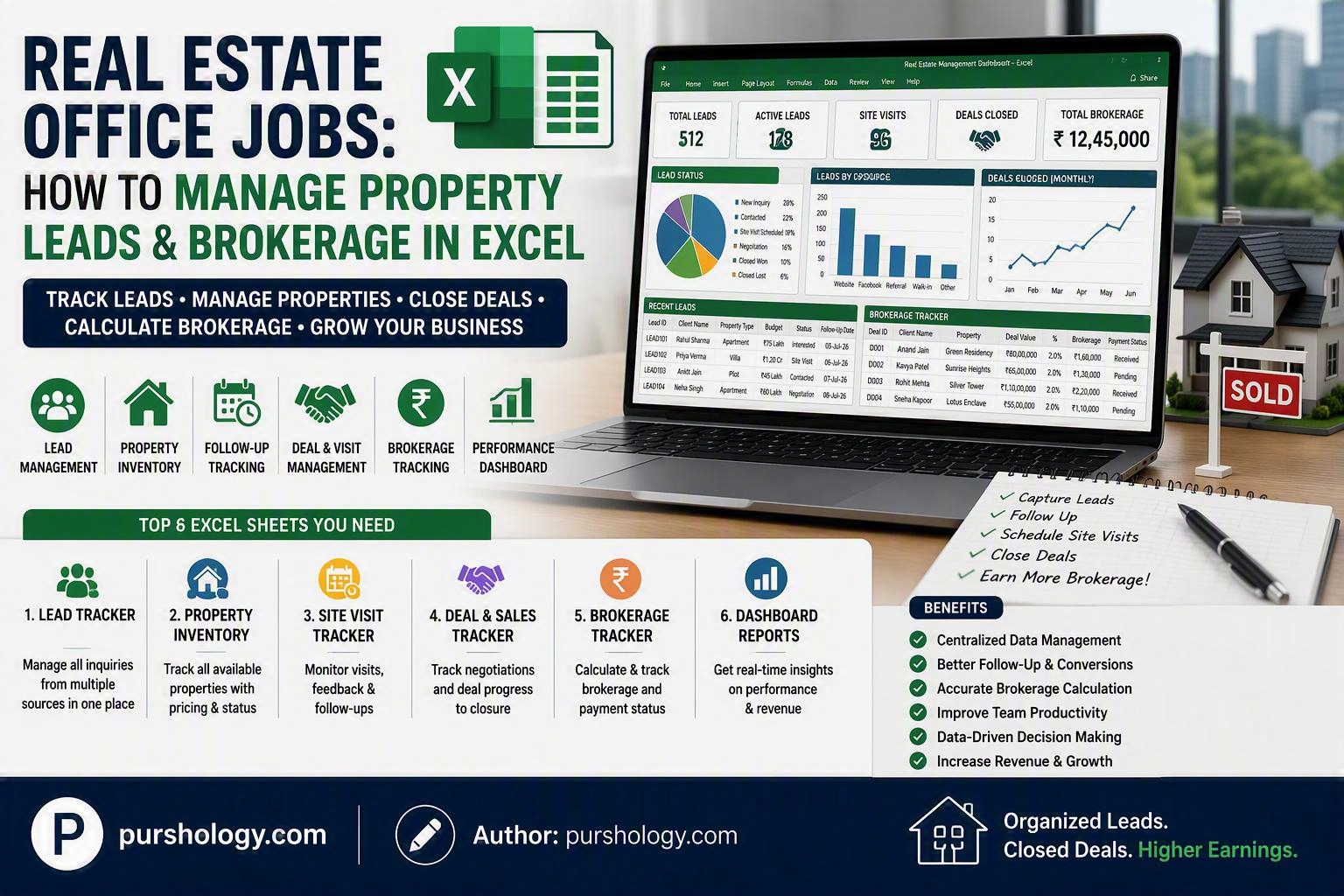
Streamline Property Sales, Client Follow-Ups, and Brokerage Tracking Using Microsoft Excel
For many real estate agencies, brokers, and property consultants, Excel remains one of the most practical and cost-effective tools for managing daily operations. Whether you’re handling residential sales, commercial leasing, plots, rentals, or property investments, a well-structured Excel workbook can help organize leads, monitor follow-ups, track deals, and calculate brokerage commissions.
If you’re working in a real estate office or managing a brokerage business, here’s how to build an effective property lead and brokerage management system in Excel.

TL;DR
Excel can help real estate teams:
✅ Track property inquiries
✅ Manage buyer and seller leads
✅ Schedule follow-ups
✅ Monitor property inventory
✅ Calculate brokerage commissions
✅ Track deal status
✅ Generate performance reports
✅ Manage team productivity
Why Use Excel for Real Estate Lead Management?
For small and mid-sized real estate firms, Excel offers:
- Low cost
- Easy customization
- Flexible reporting
- Familiar interface
- Quick implementation
- Multi-user sharing via OneDrive
Before investing in expensive CRM solutions, many agencies successfully manage hundreds of leads using Excel.
Sheet 1: Property Lead Tracker
Create a worksheet called Property Leads.
Recommended Columns
| Lead ID | Date | Client Name | Mobile Number | Property Type | Budget | Area | Source | Status | Follow-Up Date |
|---|---|---|---|---|---|---|---|---|---|
| LEAD001 | 01-Jul-2026 | Rahul Sharma | 98XXXXXXX | Apartment | ₹75 Lakh | Indore | Facebook Ads | Interested | 05-Jul-2026 |
Lead Status Options
- New Inquiry
- Contacted
- Site Visit Scheduled
- Site Visit Completed
- Negotiation
- Booking
- Closed Won
- Closed Lost
Using Data Validation dropdowns makes updating statuses quick and consistent.
Sheet 2: Property Inventory
Maintain all available listings.
Recommended Columns
| Property ID | Property Name | Location | Type | Owner Name | Asking Price | Availability | Assigned Agent |
|---|---|---|---|---|---|---|---|
| P001 | Green Residency | Vijay Nagar | Apartment | Mr. Patel | ₹65 Lakh | Available | Amit |
Benefits:
- Quick inventory search
- Reduced duplicate listings
- Better lead-property matching
Sheet 3: Site Visit Tracker
Monitor customer visits effectively.
Columns
| Visit Date | Lead Name | Property | Agent | Visit Status | Remarks |
|---|
Visit Status
- Scheduled
- Completed
- Rescheduled
- No Show
This helps measure conversion rates from visits to bookings.
Sheet 4: Brokerage Tracker
One of the most important worksheets for any real estate office.
Columns
| Deal ID | Client | Property | Deal Value | Brokerage % | Brokerage Amount | Payment Status |
|---|---|---|---|---|---|---|
| D001 | Anand Jain | Green Residency | ₹80,00,000 | 2% | ₹1,60,000 | Received |
Brokerage Formula
=Deal_Value*Brokerage_Percentage
Example:
=8000000*2%
Result:
₹160000
Sheet 5: Agent Performance Dashboard
Track individual performance.
Metrics
- Leads Assigned
- Site Visits Conducted
- Deals Closed
- Total Brokerage Earned
- Conversion Rate
Example Formula:
=Deals_Closed/Total_Leads
Conversion rate helps identify top-performing brokers.
Sheet 6: Payment Collection Tracker
Track pending client payments and brokerage receipts.
Columns
| Client | Property | Total Amount | Received | Pending | Due Date |
|---|
Pending Amount Formula
=TotalAmount-Received
This helps real estate firms improve cash flow management.
Useful Excel Formulas for Real Estate Offices
Count Total Leads
=COUNTA(B2:B500)
`
Count Closed Deals
=COUNTIF(I:I,”Closed Won”)
Total Brokerage Earned
=SUM(F:F)
Pending Follow-Ups
=COUNTIF(StatusRange,”Interested”)
Average Deal Value
=AVERAGE(DealValueRange)
Create a Real Estate Dashboard
Build a dashboard using Pivot Tables and Charts.
KPIs to Display
Lead Management
- Total Leads
- New Leads Today
- Active Leads
- Closed Leads
Sales Metrics
- Total Deal Value
- Monthly Closures
- Brokerage Generated
Agent Metrics
- Best Performing Agent
- Site Visit Conversion Rate
- Top Lead Sources
Marketing Metrics
- Facebook Leads
- Google Leads
- Referral Leads
- Walk-in Leads
Visual dashboards help management make faster business decisions.
Automations You Can Add
Conditional Formatting
Highlight:
- Follow-ups due today
- Delayed follow-ups
- Pending payments
- Hot leads
Example:
- Green = Closed Deal
- Yellow = Negotiation
- Red = Follow-Up Overdue
Dynamic Lead Aging
Calculate how long a lead has been inactive.
=TODAY()-LastContactDate
This helps sales teams prioritize old opportunities.
Best Practices for Real Estate Excel Management
Assign Unique IDs
Use IDs for:
- Leads
- Properties
- Deals
- Agents
Update Daily
An outdated spreadsheet quickly becomes ineffective.
Use Drop-Down Menus
Maintain consistency across:
- Status fields
- Property types
- Lead sources
- Payment status
Backup Regularly
Store files in:
- OneDrive
- SharePoint
- Google Drive
Restrict Editing
Protect formulas and reports while allowing agents to update lead information.
Final Verdict
Excel remains a powerful tool for real estate lead management and brokerage tracking, especially for small to mid-sized agencies. By combining lead tracking, property management, follow-ups, brokerage calculations, payment monitoring, and performance dashboards in a single workbook, real estate offices can improve productivity and close more deals without investing in expensive CRM software.
As your agency grows, the processes established in Excel can also make it easier to transition to a dedicated real estate CRM.
Ready to Organize Your Real Estate Operations?
Build a centralized Excel system to track leads, manage property inventory, monitor follow-ups, and calculate brokerage earnings. A structured spreadsheet can help your team stay organized, improve conversions, and maximize revenue.
Start creating your real estate lead and brokerage management workbook today and turn Excel into a powerful sales management tool for 2026 and beyond.