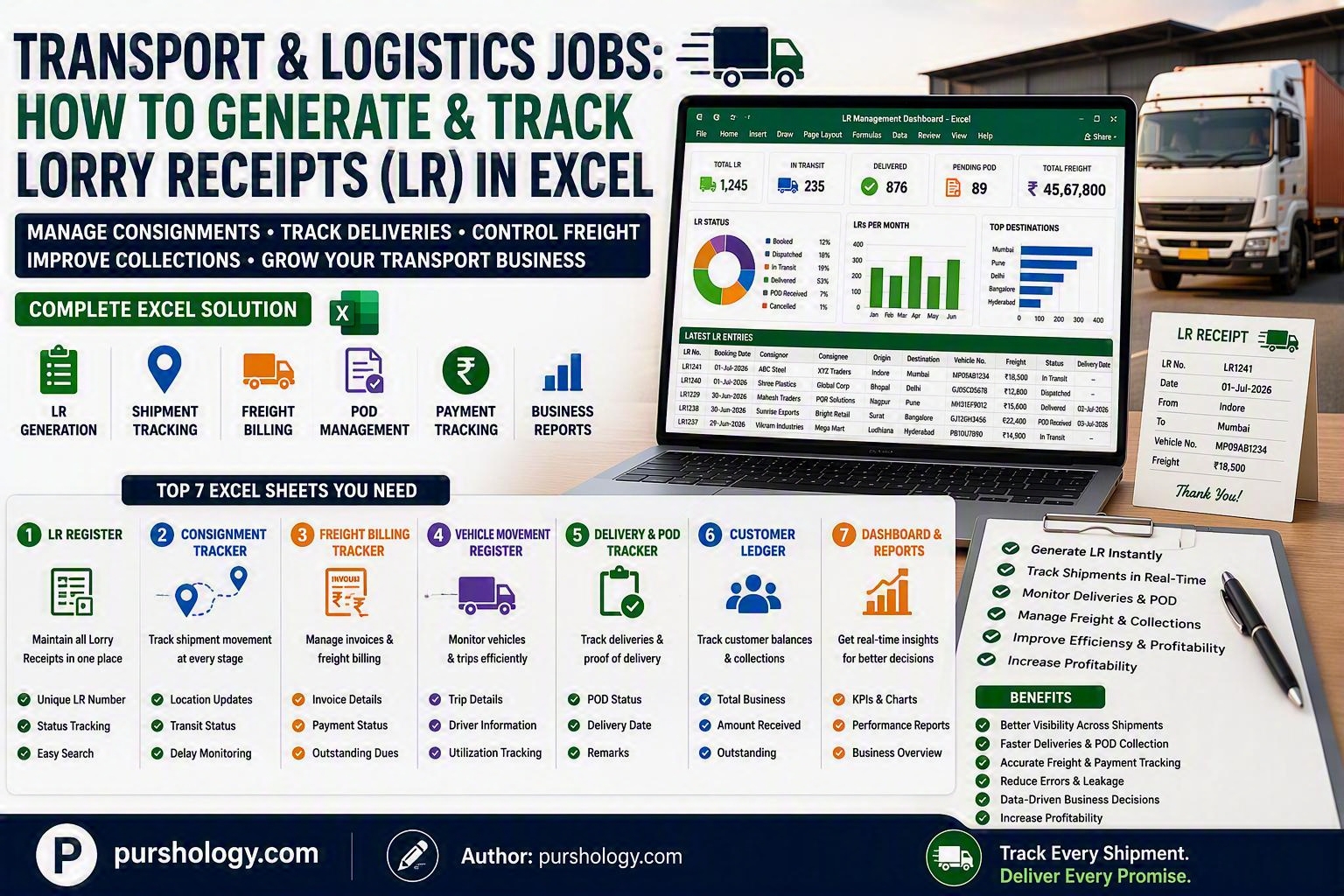
A Practical Guide to Managing Consignments, Freight Billing, and Delivery Tracking Using Microsoft Excel
For transport companies, freight brokers, truck operators, and logistics firms, the Lorry Receipt (LR) is one of the most important operational documents. It acts as proof of shipment, helps track consignments, supports freight billing, and serves as a reference throughout the delivery process.
While specialized Transport Management Systems (TMS) are available, many small and mid-sized logistics businesses still rely on Microsoft Excel to generate, maintain, and monitor Lorry Receipts efficiently.

This guide explains how transport and logistics teams can create a simple yet powerful LR tracking system using Excel.
TL;DR
Excel can help transport businesses:
✅ Generate unique LR numbers
✅ Track consignments
✅ Monitor vehicle movements
✅ Manage freight charges
✅ Track deliveries
✅ Record POD (Proof of Delivery)
✅ Monitor pending payments
✅ Generate operational dashboards
What Is a Lorry Receipt (LR)?
A Lorry Receipt (LR) is a transport document issued by a carrier acknowledging the receipt of goods for transportation.
Typically, an LR includes:
- LR Number
- Booking Date
- Consignor Details
- Consignee Details
- Vehicle Number
- Origin
- Destination
- Goods Description
- Freight Charges
- Delivery Status
The LR acts as the primary reference document throughout the shipment lifecycle.
Why Use Excel for LR Management?
Excel allows logistics companies to:
- Maintain centralized shipment records
- Eliminate manual registers
- Reduce tracking errors
- Create searchable databases
- Monitor delivery performance
- Track freight collections
- Generate business reports
For growing transport businesses, Excel provides a flexible and affordable solution.
Sheet 1: LR Register
Create a worksheet called LR Register.
Recommended Columns
| LR No. | Booking Date | Consignor | Consignee | Origin | Destination | Vehicle No. | Material | Freight Amount | Status |
|---|---|---|---|---|---|---|---|---|---|
| LR0001 | 01-Jul-2026 | ABC Steel | XYZ Traders | Indore | Mumbai | MP09AB1234 | Steel Coils | ₹18,500 | In Transit |
LR Status Options
- Booked
- Dispatched
- In Transit
- Arrived
- Delivered
- POD Received
- Cancelled
Use drop-down lists to ensure consistency.
Sheet 2: Consignment Tracking
Track movement updates throughout transit.
Columns
| LR No. | Date | Location | Update Status | Remarks |
|---|---|---|---|---|
| LR0001 | 02-Jul-2026 | Dhule | In Transit | On Schedule |
Benefits include:
- Shipment visibility
- Customer status updates
- Delay monitoring
Sheet 3: Freight Billing Tracker
Monitor billing and collections.
Columns
| LR No. | Client Name | Freight Amount | Invoice No. | Invoice Date | Payment Status |
|---|---|---|---|---|---|
| LR0001 | XYZ Traders | ₹18,500 | INV001 | 03-Jul-2026 | Pending |
Payment Status
- Pending
- Partially Paid
- Paid
- Overdue
Sheet 4: Vehicle Movement Register
Monitor truck utilization.
Columns
| Vehicle No. | Driver Name | LR No. | Dispatch Date | Destination | Current Status |
|---|
Useful for:
- Fleet planning
- Vehicle allocation
- Driver monitoring
Sheet 5: Delivery & POD Tracker
Proof of Delivery (POD) is critical in logistics operations.
Columns
| LR No. | Delivery Date | POD Received | POD Date | Delivery Remarks |
|---|
POD Status
- Pending
- Received
- Disputed
This helps reduce billing delays.
Sheet 6: Customer Ledger
Track business generated by customers.
Columns
| Customer Name | Total Shipments | Total Freight | Amount Received | Outstanding |
|---|
Outstanding Formula
=Total_Freight-Amount_Received
This provides quick visibility into receivables.
Sheet 7: LR Generator
Create an automatic LR numbering system.
Formula Example
=”LR”&TEXT(ROW(A2),”0000″)
Output:
LR0001
LR0002
LR0003
This ensures every shipment receives a unique LR number.
Useful Excel Formulas
Count Total Shipments
=COUNTA(A:A)-1
Count Delivered Shipments
=COUNTIF(J:J,”Delivered”)
Total Freight Revenue
=SUM(I:I)
Outstanding Payments
=SUMIF(PaymentStatusRange,”Pending”,FreightAmountRange)
Delivery Success Rate
=DeliveredShipments/TotalShipments
Build a Logistics Dashboard
Use Pivot Tables and Charts for management reporting.
Operations KPIs
- Total LR Generated
- Active Shipments
- Delivered Consignments
- Delayed Shipments
Revenue KPIs
- Freight Revenue
- Pending Collections
- Month-wise Revenue
- Top Customers
Fleet KPIs
- Active Vehicles
- Vehicle Utilization Rate
- Average Delivery Time
Customer KPIs
- Most Valuable Customers
- Repeat Customers
- Outstanding Dues
Conditional Formatting Ideas
Highlight Important Deliveries
Green
- Delivered
Yellow
- In Transit
Red
- Delayed or Pending POD
Highlight Outstanding Payments
Create alerts for:
Payment Due > 30 Days
This helps improve collections.
Shipment Aging Report
Monitor shipments that remain undelivered for long periods.
Formula
=TODAY()-DispatchDate
This identifies delayed deliveries requiring attention.
Best Practices for LR Management
Use Unique LR Numbers
Never duplicate consignment IDs.
Update Shipment Status Daily
Accurate updates improve customer satisfaction.
Track POD Closely
Delayed PODs often delay payments.
Maintain Customer-Wise Records
Improves service and collection efficiency.
Store Files on OneDrive
Allows team access and real-time updates.
Protect Formulas
Prevent accidental modifications to critical calculations.
Final Verdict
Excel remains a practical and effective tool for transporters, freight brokers, and logistics operators that need a simple system for managing Lorry Receipts. By combining LR generation, shipment tracking, freight billing, POD management, and customer ledgers in a single workbook, logistics companies can improve visibility, reduce operational errors, and accelerate payments.
As shipment volumes increase, this Excel-based process can also serve as the foundation for a future Transport Management System (TMS).
Ready to Improve Your Logistics Operations?
Build a centralized Excel-based LR management system to track consignments, vehicles, deliveries, freight collections, and customer accounts. A well-designed workbook can improve efficiency, strengthen customer service, and help your transport business scale.
Start organizing your Lorry Receipt process today and make Excel a powerful logistics management tool for 2026 and beyond.