• Free Apps & Solutions
  • IT Blog
    • Quick Tips
    • Softwares We Suggest
    • Ecommerce Trends
    • Business Communication
    • News & Events
    • Visual learning
    • Trending
    • Case Study
    • Design
    • HR
  • Case Studies
  • Become Partner
  • Contact Us
purshoLOGY
  • Home
  • Products
    • Saas Solutions
    • On Premise Software
      • piQLE – Customer Relationship Management System
      • parCHI – Mobile Billing Software
      • schoLARLY – School Management System
      • cureIT – Hospital management System
      • cafePOS Restaurant Billing Software
      • driveIN – Restauant POS System
      • mediBILL – Pharmacy Software
      • autoFIXER – Auto Shop Workshop Software
      • spaLON – Salon Management Software
      • gstBILL – GST Software for Billing
      • campUSO – Training Management System
      • holdYN – – Assets Management System
      • bookROOM – Library Management System
      • labZ – LIMS Laboratory Software
      • impLOE – Human Resource Payroll Software
      • Hospital Software For Small Hospitals
    • Cost Estimator
      • Business Portfolio Website
      • Ecommerce Website Calculator
      • Powerpoint Presentation Design Calculator
      • Video Production For Social Media Marketing
    • Free Apps & Solutions
  • Services
    • Custom Development
    • Happier Workplace Environment
    • Branding and Identity
    • Web and Application Development
    • Hosting with Email
    • Safe Web / Malware Scan
    • Digital Footprint
  • our gigs
  • Company
    • Overview
    • What we do
    • Mission & Values
    • Our People
    • Locations
    • Contact Us
  • Shared Secrets
    • Articles
    • Case Studies
  • Request Demo
Arratai
Softwares We Suggest

New account management tools inside Zapier

by Mr.Pursho
on 20/10/2022
A simplified user interface design representing a portion of Zapier's platform. There's a vertical menu of platform options. At the top is a dominant orange button with text inside that reads 'Create Zap.' Beneath the button is a stack of menu icons to represent dashboard, Zaps, and Transfers.
Scroll Down
  • Previous Post RingCentral China is recognized as one of the Best Workplaces in Asia 2022 | #customersupport #supporticket
  • Next Post MyOperator Announces #TarakkiKaTyohar

After chatting with hundreds of Zapier customers, we’ve learned that many of you use automation for more than personal productivity. You’re powering entire businesses with Zaps. These conversations have made one thing abundantly clear: 

CRM for small business

Automators don’t work alone. And to achieve your goals, teams need automation solutions specifically designed to meet the needs of any organization of any size. 

Today, we’re excited to share new account management tools inside Zapier to help you unleash automation across your entire company. From subfolders and a condensed way to view your Zaps to a new Super Admin role, here’s an overview of Zapier’s newest features. 

Subfolders 

When you’re creating a lot of Zaps, it’s easy to lose track of things. With subfolders, you can organize your Zaps with nested folders—making it a breeze to collaborate and manage your account. Plus, when you create a subfolder, the sharing permissions automatically remain the same as the top-level folder.

Here’s how to create subfolders: 

  1. In Zaps, click the three dots … to the right of the folder where you want to add a subfolder. 

  2. Select New Folder and give it a title in the pop-up window that appears. 
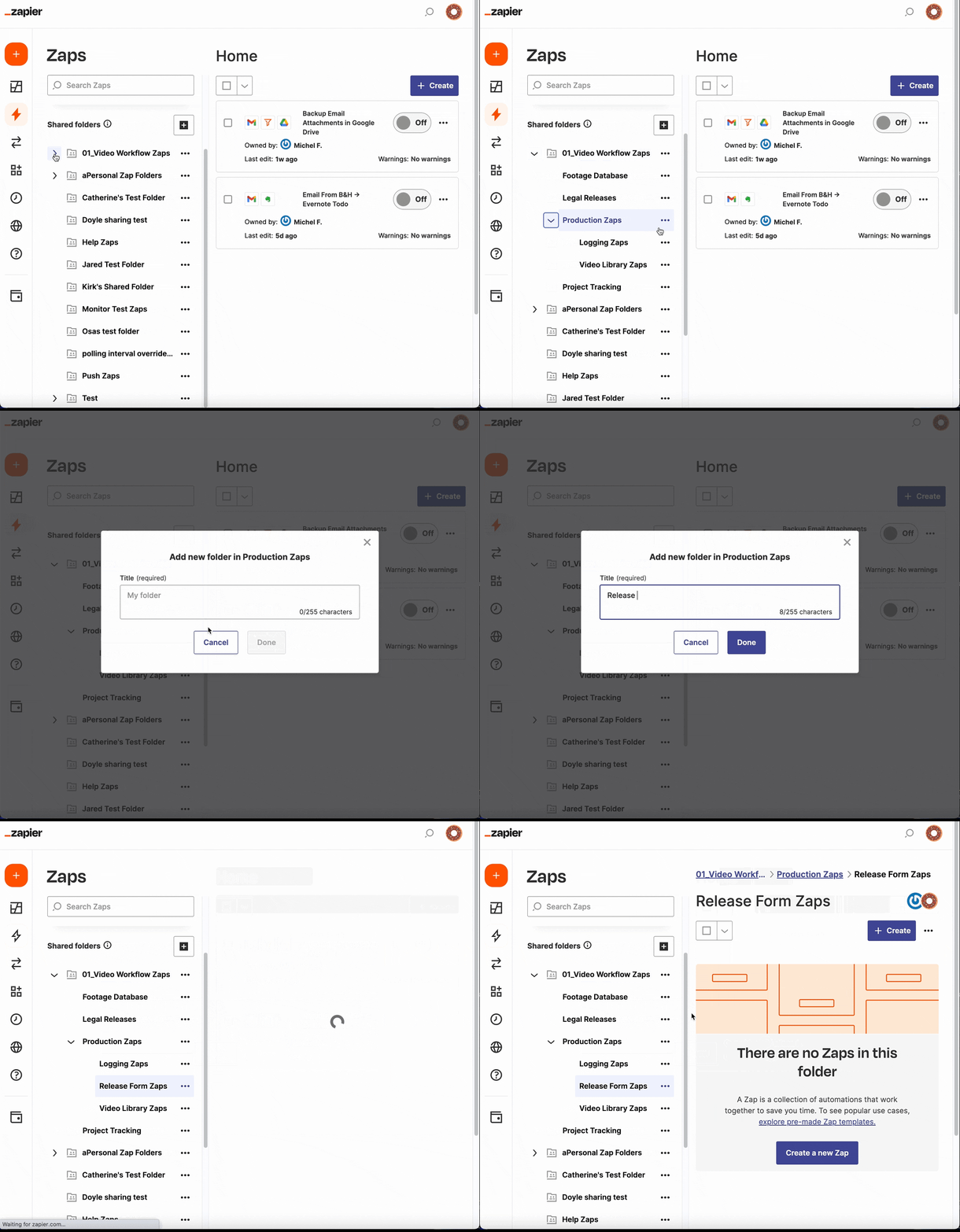
A GIF of creating a subfolder in a Zapier account.

Note: You can add up to four subfolders within any given folder. 

To navigate through your subfolders, you can: 

  • Use the sidebar. Click the arrow > to the left of the folder icon to expand a folder containing subfolders. 

  • Follow the breadcrumbs. If you’re in a subfolder, a breadcrumb trail will appear at the top of the main content area. To quickly navigate back to the parent folder, click your desired folder name in this trail. 
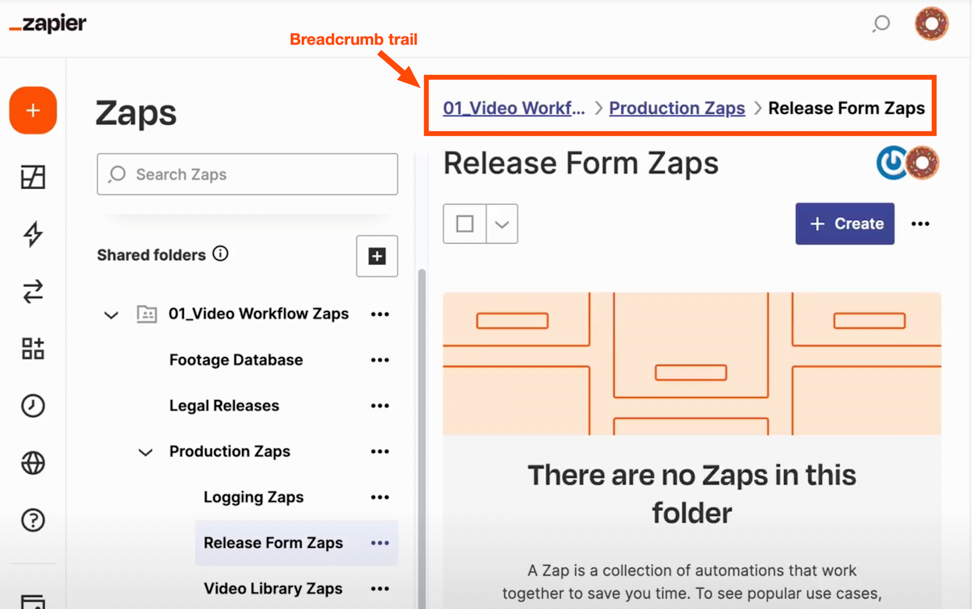
An orange box with the label breadcrumb trail around a breadcrumb at the top of a folder view.

A breadcrumb trail is a navigational aid that helps you keep track of where you are within Zapier.

Try subfolders for yourself—organize your Zaps today.

Info-dense view 

Sometimes all you need is a high-level overview of your Zaps. With the new info-dense view, you can see all your Zaps on one page, including owner details and running status. 

Potential issues with Zaps are also now front and center in the Warnings column—no need to go to the Pending or Held tabs to troubleshoot a Zap. This makes it easier to manage Zaps as your team—and workflows—grow. 
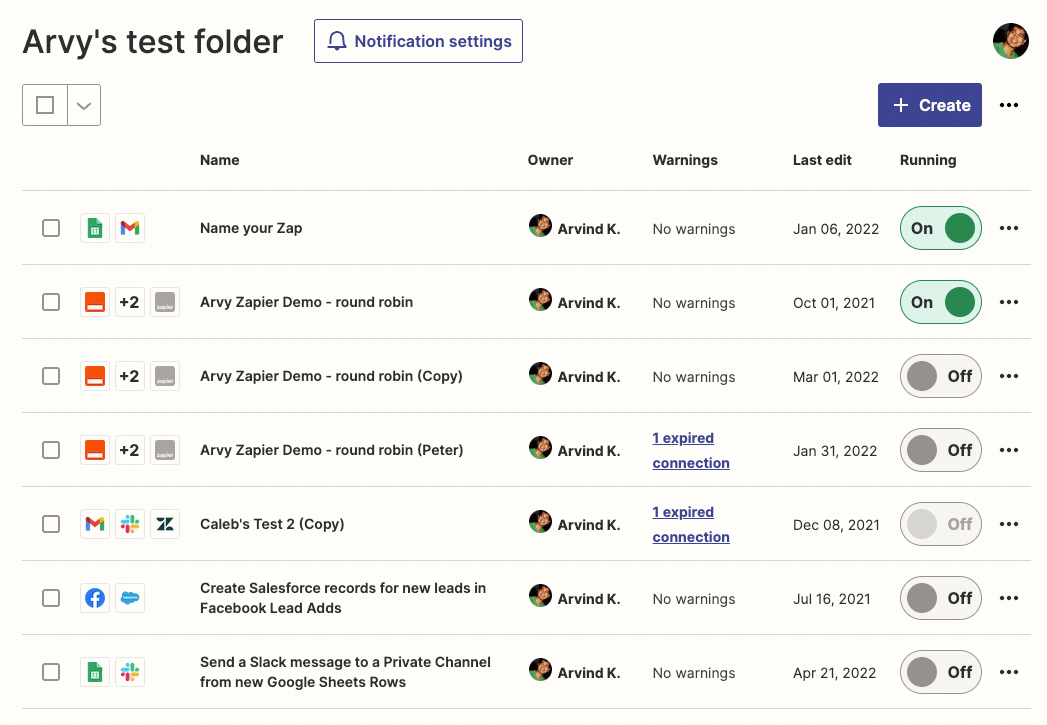
A view inside a Zapier account with a list of Zaps organized with the info-dense view.

Log into your account to check out the new view. 

Super Admin role 

As your team grows, you need an easy way for admins to manage team members and Zaps in your Zapier account. With the new Super Admin role, you can gain full visibility into your account and troubleshoot all Zaps—including private ones—so you can feel confident adding new users to your account.

Here’s what some users are saying about the new Super Admin role: 

As the owner of the account, it’s useful to know exactly what’s going on in the account for all users. We currently share logins because it was too hard to not have access to certain Zaps, this will definitely help.

Nathan Weill, Flow Digital

The ability to manage other people’s zaps is critical. We’ve had turnover and there are folks we don’t have access to their Zaps and had to get access to log in as them.

Jason Daniels, SelectQuote

If you haven’t tried it out already, here’s a quick breakdown of how it works: 

If you’re an account Owner on a Team or Company account, you have the same capabilities as a Super Admin. 

If you’re on a Company account, Owners can assign Super Admin privileges to as many teammates as they need. Here’s how: 

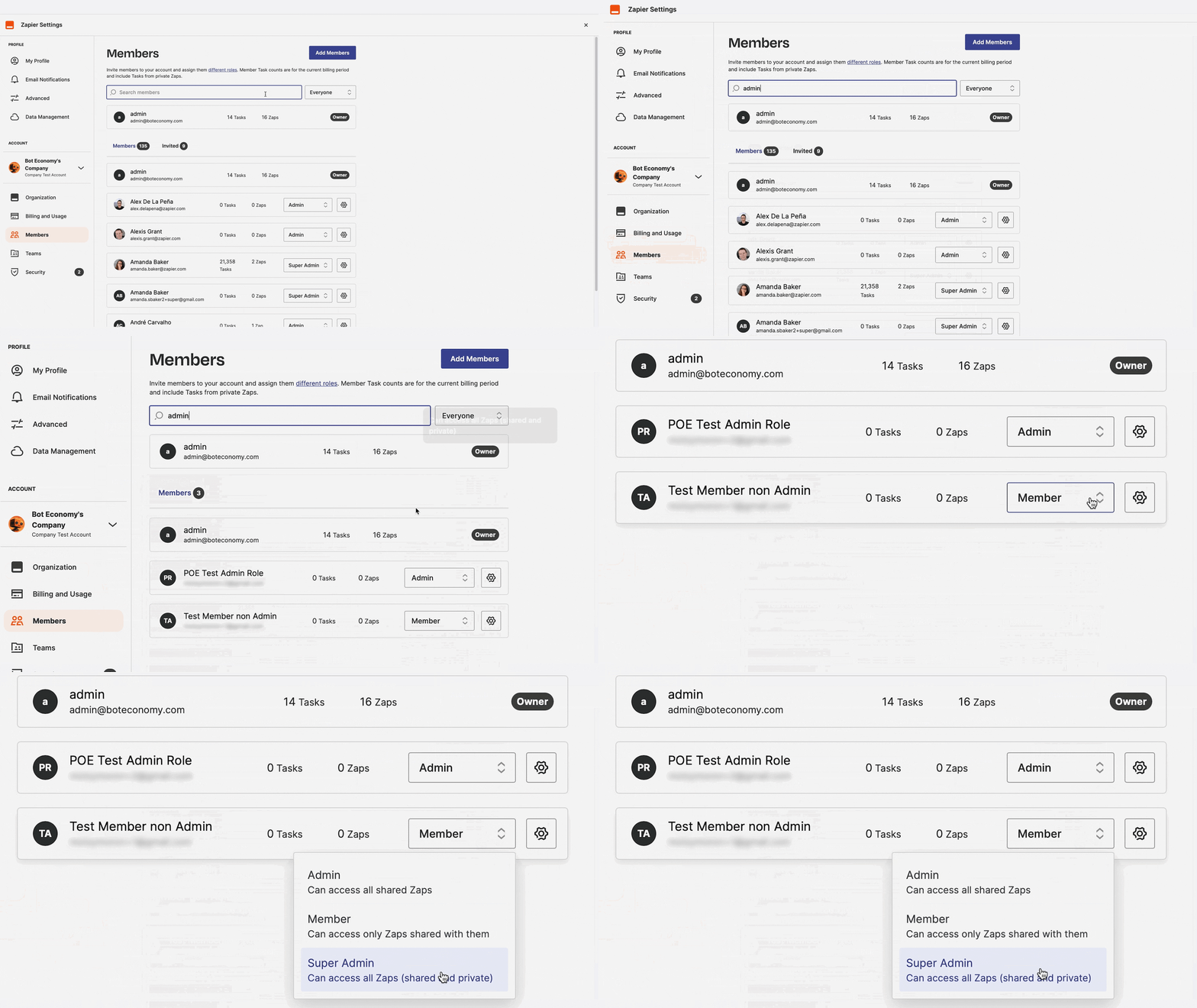
  1. On the Members page, select the dropdown menu to the right of the teammate you want to give Super Admin privileges to. 

  2. Select Super Admin.

    A GIF showing a user searching for a member in a Zapier account and changing their status to Super Admin.

Ready to assign Super Admin privileges? Let’s go. 

Note: Account Owners and Super Admins will not be able to edit or use steps in a Zap that include your personal app connections. Here’s a detailed list of the permissions available for each role in Company accounts.

Multiply your impact 

No matter your current team size, these new account management tools will allow you to seamlessly organize your Zaps—making it easy to scale as your team grows. 

And when it comes to what’s possible with automation for you and your teams, we’re just getting started. We’ve been busy building the features teams and organizations need to multiply their impact. Learn more about Zapier’s new editor capabilities that will make cross-collaboration, editing Zaps, and troubleshooting more reliable, secure, and seamless.

Source link

Need Any Technology Assistance? Call Pursho @ 0731-6725516

Account Best Software Providers In India Management Online business consultancy pursho Purshology Saas Company In India SAAS Company In Indore Software Company In Indore Software consultant Technology Consultant tools Top Software Firms In India Zapier

Related Posts

Best Email Marketing Platforms with 10,000+ Free Sends Per Month
Best Email Marketing Platforms with 10,000+ Free Sends Per Month 13/05/2026
Top 5 SEO Tools You Can Actually Use for Free (No Credit Card Required)
Top 5 SEO Tools You Can Actually Use for Free (No Credit Card Required) 13/05/2026
10 Best SaaS Tools with Lifetime Free Tiers (No Credit Card Required)
10 Best SaaS Tools with Lifetime Free Tiers (No Credit Card Required) 13/05/2026

Search For

Recent Posts

  • Best Email Marketing Platforms with 10,000+ Free Sends Per Month
  • Top 5 SEO Tools You Can Actually Use for Free (No Credit Card Required)
  • 7 Best Web Hosting Services with a 30-Day Free Trial in 2026
  • 10 Best SaaS Tools with Lifetime Free Tiers (No Credit Card Required)
  • The Postman Playbook: From a Side Project in Bangalore to a $5B API Tool
FREE Business Expert Consultation
Have any questions?
Call: +91-22-69718150
purshology logo pursho

our vertical solutions expertise allows your business to streamline workflow, and increase productivity.

purshology logo pursho

our company

  • About Us
  • Our People
  • IT Blogs
  • Contact Us
  • Saas Solutions
  • On Premise Software
  • Custom Development
  • Cost Estimator
  • Free Apps & Solutions

contact info

  • imgChat with an Expert online now
  • Call: +91-22-69718150
  • Send a Message
FREE Business Expert Consultation
Certified Partner Badge Icon
Copyright © 2023 PURSHO. superCharged by purshoLOGY | iNVENtEd @ PURSHO
Go to Top
  • Homepage
  • Saas Solutions
  • Enterprise Technology Services
    • Custom Development
    • Branding & Identity
    • Web and Application Development
    • Digital Footprint – Online Presence
    • Hosting with Email
    • Safe Web / Malware Scan
    • Happier Workplace Environment
    • Digital Assets
  • IT Blog
  • Contact Us
  • Request Demo
  • On Premise Software
  • Cost Estimator
  • Free Apps & Solutions
Arratai