
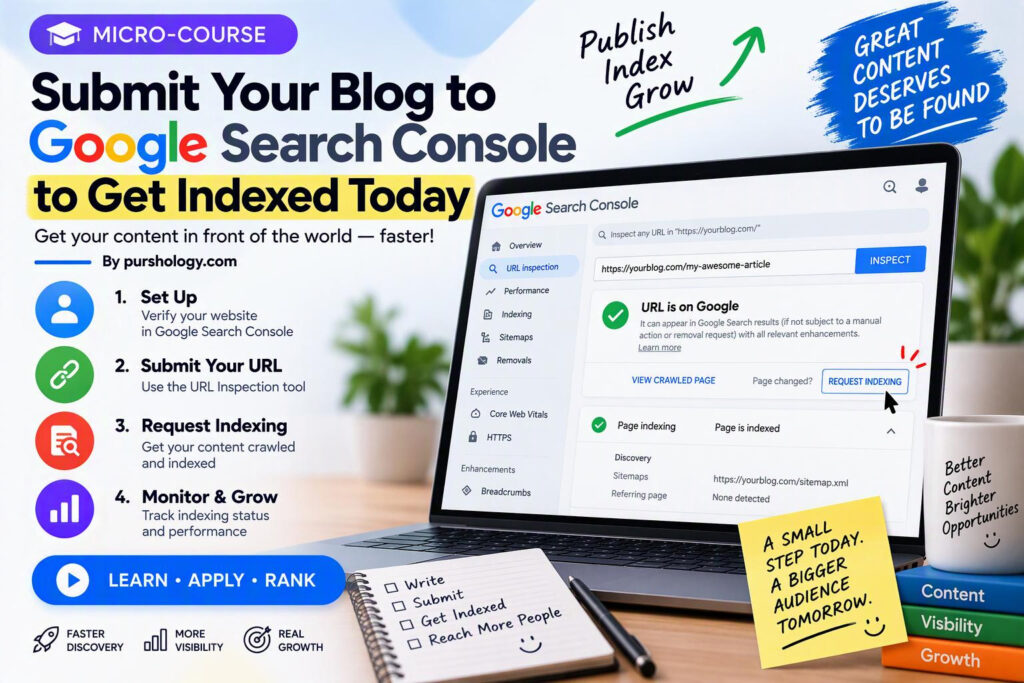
Quick answer: To ask Google to discover a new blog post, verify your site in Google Search Console, open URL Inspection, enter the full published URL, test it, and select Request indexing if the page is eligible. Also submit your XML sitemap and make sure the page is crawlable and indexable. You can submit the request today, but Google does not guarantee that the page will be indexed today—or indexed at all.
This micro-course is designed for bloggers, WordPress site owners, and small businesses that want a repeatable process instead of repeatedly searching Google for their new article.
Before you start
- The post must be publicly accessible. A WordPress draft, private post, or password-protected page is not a normal candidate for public Google Search indexing.
- You need access to the relevant verified property in Google Search Console.
- Copy the final canonical URL, including HTTPS and the correct www/non-www version.
- Check that the article is genuinely useful, original, and not a thin duplicate of another page.
Step 1: Publish and check the page
First, open the published post in a private/incognito browser window. Confirm that it loads without logging in, redirects to the intended URL, and displays the full article. If you are using WordPress, confirm the post status is Published, not Draft or Pending.
Look for obvious technical blockers: a password prompt, an unexpected redirect, a 404 page, a server error, or a page that accidentally carries a noindex directive. Do not submit a draft URL and expect it to appear publicly.
Step 2: Open URL Inspection
- Open Search Console and select the correct website property.
- Paste the complete blog-post URL into the URL Inspection field at the top.
- Review the indexed result. If Google has not indexed the page, read the reason shown rather than clicking buttons blindly.
- If useful, choose Test Live URL to check whether Google can access the current version.
The stored index result and a live test are different views. The live test can help detect current access problems, but it does not itself mean the URL has been added to Google’s index.
Step 3: Request indexing
If the page passes the relevant checks and is eligible, select Request indexing. Google may place the URL in a crawl queue. Repeatedly submitting the same unchanged URL does not create a guaranteed priority lane, and Search Console has request limits.
Google’s official URL Inspection guidance explains the process and makes clear that a request is not a guarantee of inclusion. Treat the request as a discovery signal—not a promise of ranking or traffic.
Step 4: Submit your XML sitemap
A sitemap is useful when your site has many posts or publishes content regularly. In Search Console, open the Sitemaps report, enter the sitemap path, and submit it. WordPress SEO plugins often generate a sitemap automatically; confirm the actual sitemap URL in your own site before submitting it.
See Google’s sitemap documentation for supported formats and best practices. A sitemap helps Google discover canonical URLs, but it does not force Google to crawl or index every URL.
Step 5: Diagnose common indexing problems
| Search Console finding | What to check | Practical next step |
|---|---|---|
| URL is unknown to Google | Internal links, sitemap, and whether the URL is public | Link to the post from a relevant existing page and submit the sitemap. |
| Blocked by robots.txt | Robots rules for the post path | Remove an accidental block only if the page should be crawled. |
| Excluded by noindex | Meta robots tag, HTTP header, SEO plugin settings | Remove noindex if the page is intended for Search. |
| Duplicate or alternate canonical | Canonical URL and similar pages | Choose the intended canonical and consolidate duplicates where appropriate. |
| Discovered/crawled, not indexed | Content value, duplication, quality, and technical access | Improve the page if it adds little unique value; do not simply keep resubmitting. |
| Server or fetch error | HTTP status, hosting stability, firewall/CDN rules | Fix the underlying response and test the live URL again. |
Step 6: Make the post worth indexing
Indexing is not just a submission task. A page should serve a clear purpose, answer the searcher’s question, and add something useful beyond a generic rewrite of existing results. Use a descriptive title, a clear introduction, meaningful headings, accurate claims, and relevant internal links. Remove filler and check that the article is not competing with an existing page for exactly the same query.
For a broader on-page checklist, read 15 SEO Optimization Techniques Every Business Should Know. If the page is new, add a contextual link to it from a relevant, already-indexed page rather than relying only on the sitemap.
What not to do
- Do not promise clients that a URL will be indexed within a fixed number of hours.
- Do not submit private, duplicate, empty, or unfinished pages.
- Do not change the URL repeatedly just to trigger a fresh crawl.
- Do not buy indexing guarantees or use automated spam links.
- Do not confuse indexing with ranking. An indexed page may still rank poorly or receive no impressions.
Five-minute publishing checklist
- Confirm the post is published and returns a successful page response.
- Check the canonical URL and remove accidental noindex settings.
- Confirm the URL is included in the site’s sitemap.
- Inspect the URL in Search Console and read the status.
- Request indexing if eligible, then monitor the URL Inspection and Performance reports over time.
Frequently asked questions
Will Google index my blog post today?
It might, but there is no guarantee. Google decides whether and when to crawl and index a page. The word “Today” in this tutorial means you can submit the request today, not that same-day indexing is assured.
Should I request indexing after every small edit?
Usually not. Request it when a new or substantially updated important page needs discovery. Repeated requests for an unchanged URL are not a substitute for a crawlable site and useful content.
Is a sitemap enough?
A sitemap helps discovery and communicates canonical URLs, but Google treats it as a hint. It does not guarantee crawling, indexing, or ranking.
Can I request indexing for a WordPress draft?
No public indexing should be expected for a draft. Publish the post first, confirm it is accessible without authentication, and then inspect the public URL.
Official references
- Google Search Console: URL Inspection tool
- Google Search Central: Build and submit a sitemap
- Google Search Central: Troubleshoot crawling errors
Prepared as a practical workflow. Search Console labels and interface details can change; use the current official documentation if your screen differs.